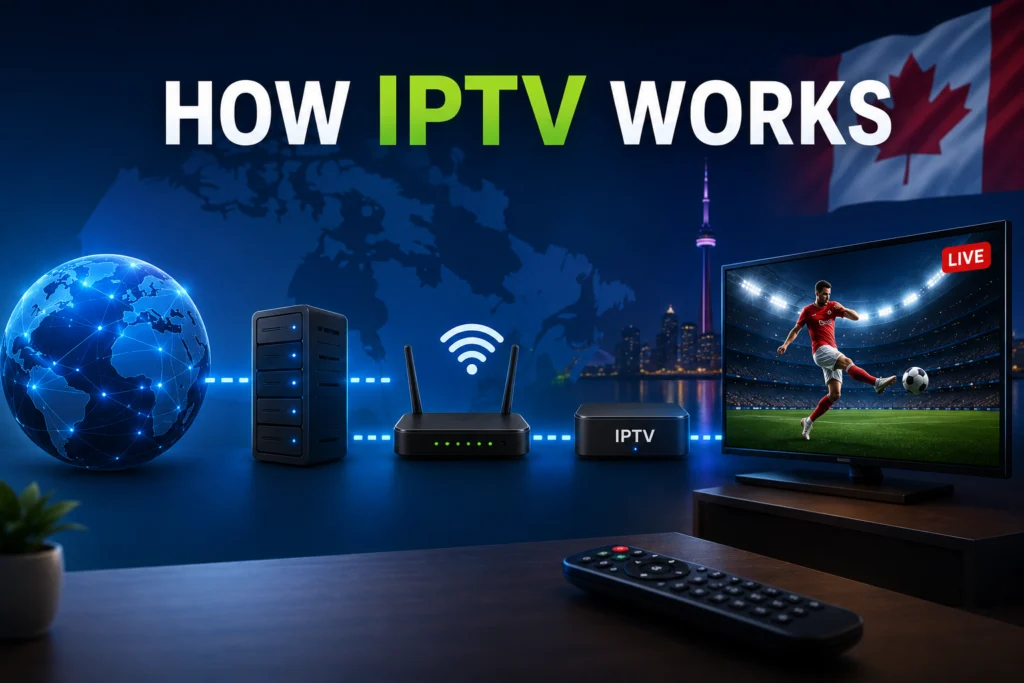
Quick answer: IPTV (Internet Protocol Television) delivers television programming through your internet connection instead of traditional cable or satellite formats. Your device requests specific content from a provider’s server, which then sends the video data in small packets over the internet directly to your screen in real time.
Millions of people use IPTV every single day without fully understanding how the technology delivers live television to their living rooms. You click a channel, and the video simply plays. However, taking a few minutes to understand the mechanics behind this technology offers major benefits. Understanding how the system operates helps you configure your setup correctly, troubleshoot issues rapidly when they arise, and choose the most reliable provider for your home.
In recent years, IPTV has exploded in popularity across Canada. Frustrated by rising cable bills and rigid channel packages, Canadians are seeking more flexible entertainment options. This shift has made internet-based streaming the new standard for home viewing.
This guide breaks down the entire content delivery process in plain, everyday language. We leave the dense technical jargon behind to give you a clear, step-by-step look at how your favorite shows travel from a broadcast center to your screen.
What exactly is IPTV and how do you define it in simple terms?
IPTV stands for Internet Protocol Television. Instead of receiving television signals through a physical cable wire running down your street or a satellite dish mounted on your roof, the content arrives over your home internet connection. This is the exact same network you currently use for browsing websites, playing online video games, and streaming services like Netflix.
You can think of the experience as being similar to watching YouTube, but specifically designed for live television channels, sports broadcasts, and extensive on-demand movie libraries. The word “protocol” sounds highly technical, but IP is simply the agreed-upon digital standard that governs how data travels across the internet.
In one sentence: IPTV is television delivered through your internet connection rather than through traditional infrastructure.
How does traditional cable TV compare to an IPTV service?
How does traditional cable TV deliver content?
Traditional cable television relies on a rigid, physical infrastructure. A broadcast tower or satellite beams a signal to your local cable company. The company then pushes that signal through physical coaxial cables directly into your home. A dedicated cable box decodes this incoming signal and displays the video on your television screen.
In this traditional model, you receive every single channel in your package simultaneously, regardless of what you actually watch. The signal only travels in one direction. It moves from the provider to your home, offering absolutely no interaction from your end.
How does an IPTV service deliver content to your home?
Internet-based television uses a completely different architecture. Providers store and stream content from high-capacity servers connected to the internet. When you select a specific channel or show, your device requests that exact stream. The server then sends only that requested content back to you.
Because the video data travels through your existing internet connection, it requires no dedicated cable line. This setup creates two-way communication. Your device actively requests media, and the server fulfills the request. This method is highly efficient because only the specific channel you are currently watching uses your internet bandwidth.
Why does the difference between cable and IPTV matter for Canadian viewers?
This fundamental difference in technology directly impacts your wallet and viewing experience. Because internet-based delivery avoids the massive costs of laying physical cables, IPTV providers can offer significantly more channels at a fraction of the cost.
Furthermore, you are no longer chained to a specific television with a rented cable box. You can watch your subscription on any internet-connected device, from smart TVs to mobile phones. However, this flexibility means your viewing quality depends entirely on the stability of your internet speed, whereas traditional cable quality remains independent of your home web connection.
What are the three main types of IPTV content delivery?
How does live IPTV streaming work?
Live streaming delivers real-time broadcasts of television channels, including live sports, breaking news, and scheduled entertainment. The content is streamed to your device the exact moment the broadcast source airs it.
This is the most technically demanding type of delivery. Because the event is happening live, your application cannot pre-load large chunks of the video. You need a highly consistent internet speed to maintain the stream. Additionally, basic live plans generally do not offer the ability to pause, rewind, or fast-forward. Because of the high demand and lack of pre-loading, streaming live sports serves as the ultimate test of any provider’s reliability.
What is Video on Demand (VOD) in IPTV?
Video on Demand encompasses pre-recorded movies, television series, and documentaries available for viewing at any time. The provider stores these massive content libraries on their own servers and transmits the video file only when you press play.
VOD is much more forgiving on your internet connection than live TV. Because the file already exists in its entirety, your application can buffer (or pre-load) several minutes of the video ahead of what you are currently watching. If your internet briefly drops, the video keeps playing from the buffer. You navigate VOD libraries through a catalog interface highly similar to Netflix.
How does Catch-Up TV let you watch past broadcasts?
Catch-Up TV, also known as time-shifted television, allows you to watch recently aired content after the original broadcast concludes. Depending on the provider, this feature typically covers content aired within the last 24 hours to 7 days.
The provider automatically records live channels on their end and stores them on their servers. You then access these recordings on demand. Unlike a traditional DVR setup in your living room, you do not need to schedule recordings, allocate hard drive space, or buy extra equipment. The provider handles the entire recording process seamlessly.
How does IPTV deliver a video stream to your screen step by step?
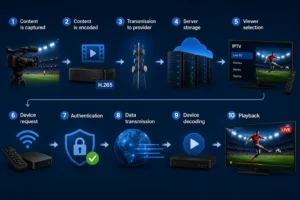
Most viewers assume the process of streaming video is magic, but it actually follows a highly logical sequence. Here is exactly how content reaches your screen:
- Content is captured: The video originates at the source, such as a sports venue, news studio, or primary broadcast center.
- Content is encoded: Specialized hardware converts the raw video feed into a compressed digital format (typically H.264 or H.265).
- Transmission to provider: This newly encoded digital content travels to the IPTV provider’s central servers.
- Server storage: The provider’s servers organize, store, and actively manage the incoming video streams.
- Viewer selection: You open your viewing application and click on a specific channel.
- Device request: Your application sends a secure digital request over the internet to the provider’s server.
- Authentication: The server instantly verifies your login credentials and locates the requested video stream.
- Data transmission: The server breaks the video down and sends it as thousands of small data packets across the internet to your IP address.
- Device decoding: Your television or streaming box receives the packets, reassembles them in the correct order, and decodes the video file.
- Playback: The video appears on your screen in real time.
With a strong internet connection and a premium provider, this complex ten-step process occurs in under two seconds.
What is the underlying technology that makes IPTV work?
What role do IP addresses play in authenticating your IPTV subscription?
Every single device connected to the internet holds an IP (Internet Protocol) address. You can think of an IP address as a digital home address for your data. When you request a channel, your device uses its unique IP address to communicate with the provider’s server. The provider uses this address to verify your active subscription and ensure they are sending the video feed to the correct authorized user.
Why are data packets crucial for streaming video?
Video files are massive. It is impossible to send an entire live broadcast as a single file. Instead, the server breaks the video content down into thousands of tiny digital envelopes called data packets. Each individual packet travels independently across the internet and arrives at your device, which stitches them back together seamlessly.
If your internet connection fluctuates, these packets may arrive out of order or get lost entirely. When the device lacks the necessary packets to display the next frame of video, the image freezes. This phenomenon, known as packet loss, is a primary cause of frustrating buffering issues.
What are video codecs like H.264 and H.265?
A codec is a specialized piece of software designed to compress outgoing video and decompress it upon arrival. This compression shrinks the massive video files so they can travel across home internet connections efficiently.
The H.264 codec serves as the industry standard for standard definition and regular HD streams because nearly all devices support it. The newer H.265 (also known as HEVC) provides much more efficient compression. Providers use H.265 to deliver ultra-high-definition 4K streams because it uses half the bandwidth of older codecs. However, H.265 requires significant processing power, meaning older streaming devices often struggle to decode it properly.
Which streaming protocols deliver your IPTV channels?
Protocols dictate the specific rules for how data moves from the server to your screen.
- HLS (HTTP Live Streaming): This is the most common protocol globally because it adapts to your internet speed and works flawlessly on almost all consumer devices.
- MPEG-TS: Providers frequently use this protocol for live broadcasts because it handles real-time content reliably.
- RTMP: This is an older, legacy protocol that is becoming less common in modern streaming environments.
Your application automatically selects and handles the correct protocol, so you never need to configure these technical settings manually.
What is an M3U playlist and how does it load your channels?
An M3U file is essentially a simple text document containing thousands of web links. Each link points directly to a specific channel stream on the provider’s server. When you input your M3U URL into your application, the software reads this text file, organizes the links, and builds your visual channel guide. Because the M3U URL grants access to the provider’s servers, it acts as the master key to your entire subscription.
What happens on the IPTV provider’s servers to make streaming possible?
Why is IPTV server capacity critical to your viewing experience?
The provider’s servers are the physical computers where all content is stored and actively managed. Server quality dictates the stability of your stream. If a provider uses cheap servers and allows too many users to connect simultaneously, the server’s processor maxes out. It physically cannot send data packets fast enough, resulting in constant buffering for all viewers. Conversely, premium providers maintain redundant, high-capacity servers to guarantee uptime.
How do Content Delivery Networks (CDNs) prevent buffering?
A Content Delivery Network (CDN) is a global network of linked servers. Instead of forcing video data to travel from a single server in Europe all the way to Canada, a CDN copies the stream to a local server situated close to the viewer. By reducing the physical distance the data travels, CDNs drastically lower latency. Major companies like Netflix rarely buffer because they invest billions in CDN infrastructure. Premium IPTV providers pay for CDN routing, while budget providers skip this expense, leading to poor performance.
What is middleware in the context of IPTV?
Middleware is the invisible software layer sitting between the raw video content and your viewing application. It acts as the central brain of the operation, managing user accounts, checking billing statuses, authenticating logins, and organizing the channel categories. The quality of a provider’s middleware directly impacts how fast and responsive your app feels when browsing categories.
How do IPTV providers compile Electronic Program Guide (EPG) data?
The EPG (Electronic Program Guide) is your digital TV guide. Providers compile EPG data by sourcing daily broadcasting schedules from third-party data aggregators for thousands of global channels. The provider’s middleware matches these text schedules to the video streams. Sourcing accurate data for thousands of niche channels is highly complex, which is why EPG data is sometimes blank or temporarily incorrect.
How does your device receive and play the IPTV stream?
When you power on your television, your streaming device connects to your router via Wi-Fi or a wired Ethernet cable. Your application sends an encrypted authentication request to the provider. Once approved, the video data begins arriving in rapid-fire packets.
Your device’s internal processor grabs these packets, decompresses them using the appropriate codec, and pushes the image to the screen. The processing power of your device is a major bottleneck. An old, cheap Android box lacks the CPU power to decode modern 4K H.265 streams, causing stuttering video regardless of your internet speed.
To ensure smooth playback, the application utilizes a buffer. It holds a few seconds of video data in reserve before displaying it. If your Wi-Fi signal drops for two seconds, the application plays the reserved footage, masking the internet drop. For maximum stability and an uninterrupted stream of data packets, hardware experts always recommend using a wired Ethernet connection instead of unpredictable Wi-Fi.
What are the best methods to access your IPTV subscription?
How do dedicated IPTV apps work?
The most popular way to stream is through dedicated applications like TiviMate, IPTV Smarters, or GSE Smart IPTV. You simply download the application to your smart TV or streaming stick, input the login credentials provided by your service, and the software handles the rest. This method requires zero technical knowledge and offers the best user interface.
How can you use an M3U URL in a media player?
If you prefer flexibility, you can paste your provider’s M3U URL directly into media players like VLC on a computer or Kodi on a set-top box. While this method requires slightly more technical comfort, it allows you to watch content on virtually any computing device without installing specialized applications.
How do Set-Top Boxes use portal URLs?
Devices specifically engineered for IPTV, such as MAG boxes and Formuler devices, use a portal URL system. Instead of installing a separate app, you enter the provider’s portal URL into the system settings. The box connects directly to the provider’s middleware, delivering a hyper-clean, cable-like interface purpose-built for channel surfing.
Can you stream IPTV through a web browser?
Many modern providers offer a dedicated web player interface. You navigate to a specific website, log in with your credentials, and stream channels directly inside Chrome, Safari, or Edge. While web players require zero installation, they are generally less reliable than dedicated applications during high-traffic sports events.
Why does streaming quality vary significantly across different IPTV providers?
The technology behind internet television is universal, yet the viewing experience varies wildly from one company to the next. The difference comes down to infrastructure investment.
The primary cause of poor quality is overselling. Cheap providers cram thousands of subscribers onto budget servers with limited bandwidth. During peak viewing hours—like 8 PM on a Saturday during a major hockey game—the server collapses under the weight of simultaneous connections. Premium providers limit their customer-to-server ratio and pay high fees for global CDNs to ensure packets flow quickly regardless of network congestion.
This is why the cheapest subscription on the market is almost never the best value. A service charging $5 a month cannot physically afford the infrastructure required to prevent buffering. If you want seamless viewing, you need a provider built for performance. For example, iptv canada actively invests heavily in dedicated server infrastructure optimized specifically for Canadian peak-hour performance, ensuring viewers get a cable-tier experience without the cable-tier price tag.
What equipment and services do you need to start using IPTV in Canada?
Transitioning from cable requires minimal equipment. To get started today, you simply need:
- A reliable internet connection: You need steady speeds. Providers recommend a minimum of 15 Mbps for standard HD and 50+ Mbps for reliable 4K streaming.
- A compatible device: You can use an Amazon Firestick, an Android TV box, a smart TV, an Apple TV, or even a basic laptop.
- A streaming application: Download an app like TiviMate or IPTV Smarters.
- An active subscription: You need a valid login (Xtream Codes) or an M3U URL from a trusted provider.
- A VPN (Recommended): Many Canadian Internet Service Providers (ISPs) actively throttle streaming traffic during prime time. A VPN encrypts your traffic to prevent this interference.
- Ethernet Cable (Optional): Hardwiring your device to your router eliminates Wi-Fi interference.
You do not need a satellite dish, you do not need to wait home for a cable technician, and you do not need to sign a multi-year contract.
Is using an IPTV service legal for Canadian residents?
The core technology of streaming live television over the internet is 100% legal in Canada. Major telecommunications companies use this exact IP protocol to deliver their own modern television packages.
The legal distinction relies entirely on broadcasting rights. Licensed services that pay for the rights to broadcast specific content operate legally. Conversely, unverified underground services that capture and redistribute copyrighted streams without paying licensing fees operate illegally.
The Canadian Radio-television and Telecommunications Commission (CRTC) regulates broadcasting, and they heavily emphasize the importance of consumer protection. Choosing a legitimate, transparent Canadian provider ensures you receive reliable customer support and a service that will not abruptly shut down overnight. Trustworthy platforms like iptv cad operate as legitimate Canadian streaming services, prioritizing compliance, privacy, and long-term reliability.
How can understanding IPTV technology help you fix common streaming problems?
When you understand the mechanics of data packets and servers, troubleshooting becomes incredibly simple.
- Constant Buffering: Video packets are arriving too slowly. This is either because your home internet speed is bottlenecking, or the provider’s server is overloaded. Reboot your router; if the issue persists, the provider’s server is the culprit.
- Freezing only at night: This indicates peak-hour congestion. Either your local ISP is struggling with neighborhood traffic, or your provider lacks the CDN infrastructure to handle the 8 PM viewer spike.
- Complete Black Screen: The application cannot authenticate your login, or the provider has temporarily lost the broadcast feed from the source.
- EPG is blank: Your application’s internal cache is full, or the provider’s EPG server is updating. Clearing your app cache usually forces a fresh download.
- Perfect internet but terrible video quality: If your speed tests show 500 Mbps but the video stutters, your internet is fine. The provider’s server capacity is the bottleneck.
Understanding these triggers allows you to fix issues rapidly without wasting time resetting equipment unnecessarily.
Make the switch and take control of your television experience
IPTV fundamentally changes how we consume media by delivering television content directly over your internet connection in real time. The ultimate quality of your viewing experience relies on three distinct pillars: the stability of your internet speed, the processing power of your chosen device, and the financial investment your provider makes in their server infrastructure.
Understanding the basic journey of a video stream—from the provider’s high-capacity servers to the data packets reassembling on your television—gives you the ultimate advantage. You have the knowledge to set your system up correctly using Ethernet, troubleshoot minor packet loss quickly, and avoid budget providers who oversell their network capacity.
Internet streaming is rapidly replacing traditional cable TV for millions of Canadians because it offers unparalleled flexibility, massive content libraries, and significant financial savings. Now that you understand the powerful technology driving this shift, it is time to upgrade your home entertainment. Try iptv cad today with a free trial and experience premium, buffer-free streaming for yourself.
Frequently Asked Questions About IPTV
What does IPTV stand for?
IPTV stands for Internet Protocol Television. It refers to the delivery of live television programming and on-demand video content over computer networks using standard internet protocols, rather than through traditional terrestrial, satellite, or cable formats.
How is IPTV different from cable TV?
Cable TV sends all available channels simultaneously through a physical coaxial cable in a one-way transmission. IPTV is a two-way system that sends only the specific channel you request through your existing internet connection, saving bandwidth and lowering infrastructure costs.
Do you need internet for IPTV?
Yes. Because the video content is stored on external servers and transmitted digitally, a stable broadband internet connection is an absolute requirement to access and view any streams.
How does live IPTV streaming work?
Live streaming captures real-time broadcasts, compresses the video into data packets, and transmits them across the internet to your device instantly. Because the event is happening live, your device cannot pre-load the file, requiring a highly consistent internet connection for smooth playback.
Why does IPTV buffer?
Buffering occurs when your device plays video faster than the required data packets can arrive over the internet. This delay is usually caused by network congestion on your home Wi-Fi, ISP throttling, or an overloaded server on the provider’s end.
What internet speed do I need for IPTV?
Industry standards recommend a minimum, highly stable connection of 15 Mbps for viewing standard High Definition (HD) channels. For streaming 4K ultra-high-definition content, you should have a minimum consistent speed of 50 Mbps.
Is IPTV legal in Canada?
The technology itself is completely legal. Subscribing to licensed providers that hold the proper broadcasting rights is legal. Utilizing unlicensed providers that distribute copyrighted material without permission violates Canadian copyright laws.
What devices can I use for IPTV?
You can stream content on almost any modern internet-connected screen. Popular devices include smart TVs, Amazon Firesticks, Android TV boxes, Apple TV, dedicated Set-Top Boxes (like MAG), desktop computers, and mobile smartphones.
What is an M3U playlist?
An M3U playlist is a simple text file provided by your streaming service that contains web links to thousands of live channels and VOD media files. Your streaming application reads this file to build your graphical channel guide.
Why is IPTV quality better on some providers than others?
Premium providers invest heavily in high-capacity servers, high-quality broadcast sources, and global Content Delivery Networks (CDNs) to ensure fast data transmission. Cheap providers cut costs on infrastructure and overload their servers with too many users, resulting in poor quality.