TL;DR: An Electronic Program Guide (EPG) is the built-in TV schedule for your IPTV app. It shows current and upcoming programs, enabling features like catch-up TV. Setting up an EPG usually requires an XMLTV link or Xtream Codes login provided by your IPTV service provider.
You open your IPTV app, ready to watch television. Thousands of channels load on your screen, but the schedule remains completely blank. You have absolutely no idea what is currently playing. Without an Electronic Program Guide (EPG), using an IPTV service feels just like flipping through cable TV channels blindfolded. It wastes your time and causes unnecessary frustration.
Despite being crucial to a smooth viewing experience, EPG remains one of the least understood features in the streaming world. This guide breaks down exactly what an EPG is and how it functions. You will learn how to configure your TV guide across major apps and troubleshoot common errors. By the end, you will know exactly how to secure accurate Canadian channel data. For example, iptv canada includes full EPG support right out of the box for all subscribers.
What is an Electronic Program Guide (EPG) on IPTV?
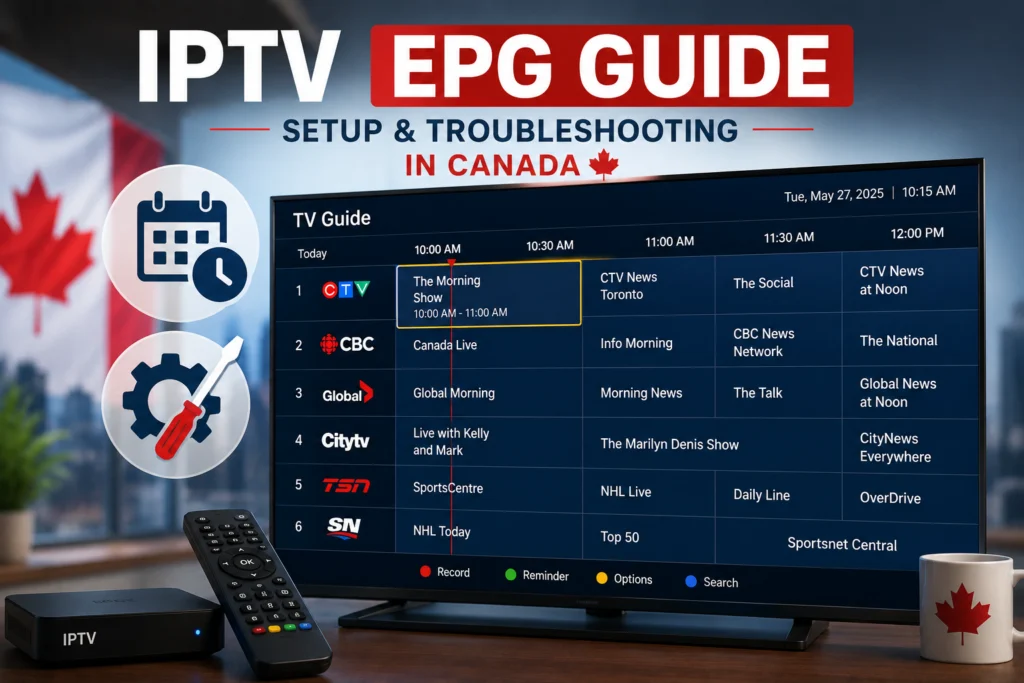
EPG stands for Electronic Program Guide. Think of it as the interactive TV guide built directly into your IPTV app. It displays what is currently airing, what shows are coming up next, and what played earlier on every single channel.
Without this program schedule, you are just guessing what is on television. The EPG transforms a raw list of network streams into a fully functional media experience. Furthermore, an accurate EPG enables catch-up TV. Clicking a past program in the guide allows you to play it back instantly, provided your IPTV service provider supports catch-up functionality. EPG is essentially the schedule file that tells your IPTV app what is playing on every channel at any given moment.
How does EPG data work behind the scenes?
EPG data originates from broadcast networks and specialized third-party data providers. Your IPTV service provider compiles this program information for thousands of channels simultaneously.
This data usually arrives in the XMLTV format, which is a standardized structured data file containing television schedules. Your IPTV app fetches this XMLTV data directly from your provider’s server or via a separate EPG URL.
Most apps refresh this data every 24 hours, though premium providers update it more frequently. When the EPG data is missing or outdated, your app will display a blank guide, incorrect show names, or wrong start times. Certain international or niche channels often lack global schedule data, resulting in a permanently blank EPG row. Keep in mind there is a major technical difference between the EPG interface loaded by your specific app and the core EPG database built into your provider’s backend system.
What are the main types of EPG data sources?
You can load guide data into your application using a few different methods depending on your provider’s infrastructure.
Provider-supplied EPG data
Your IPTV service provider usually bundles EPG data with your subscription. This data loads automatically when you input your playlist URL or Xtream Codes credentials into an app. This remains the most convenient option because it requires zero extra setup. However, quality varies significantly across the industry. Premium providers invest heavily in accurate EPG data, while budget providers often ignore it. As a premium choice, iptvcad includes highly accurate Canadian EPG data with every single subscription.
Third-party EPG URLs
A third-party EPG URL points your app to an external data source. Viewers use these external XMLTV links when their provider’s built-in EPG proves missing or inaccurate. You can find reliable third-party XMLTV links specifically for Canadian channels online, and easily paste them into your app’s settings menu.
App-specific built-in EPG data
Certain IPTV apps maintain their own built-in guide data. This functions completely independently of your provider. While useful as a fallback option when your primary guide fails, these built-in sources typically only cover major international networks.
Services with no EPG
Some budget providers offer absolutely no EPG at all. Your interface will show a blank schedule and missing program descriptions. You should treat a missing EPG as a major red flag when evaluating a provider during a free trial. For context, iptv canada includes full EPG access as a standard feature rather than an optional add-on.
What does a high-quality EPG interface look like?
A well-configured guide makes navigation effortless. It clearly displays the current program showing on each channel alongside its title and a brief description. You will see precise start and end times for every single show.
A premium guide offers a multi-day schedule, ideally reaching seven days forward and at least 24 hours backward to support catch-up viewing. Program descriptions provide details like genre, cast members, and specific episode numbers. Timing remains perfectly accurate. You will also see channel logos displayed next to each entry, allowing for quick visual identification. Many modern apps even use color coding to distinguish movies, live sports, news broadcasts, and children’s programming. Conversely, a poor EPG features misspelled show names, skipped time blocks, blank entries, and data that lags several days behind the actual broadcast.
How do you set up EPG in TiviMate?
TiviMate offers the most robust EPG implementation of any modern IPTV application. In most cases, the guide loads automatically the moment you add your M3U URL or enter your Xtream Codes login details.
To check if your schedule loaded correctly, open TiviMate and navigate to the TV Guide tab. Confirm that programs populate the schedule for at least the next 24 hours. Check a familiar channel to verify the accuracy of the listed shows.
What to do if TiviMate EPG fails to load automatically
If the guide remains blank, follow these exact steps:
- Navigate to TiviMate Settings.
- Select Playlists.
- Tap the specific name of your playlist.
- Choose the EPG option.
- Enter your EPG URL manually into the text field.
- Save your changes and return to the home screen.
- Wait a few minutes for the initial data download to complete.
Managing TiviMate guide updates and cache
You can force a manual refresh by going to Settings, selecting EPG, and clicking Update EPG Now. Do this whenever the guide displays outdated information. If the guide shows completely wrong programs or encounters errors, clear the cache by going to Settings, EPG, and selecting Clear EPG Data. This forces the app to fetch a brand new schedule file.
Optimize your experience by adjusting a few settings. Lower the number of EPG days to save device memory. Set the automatic update time to run overnight while you sleep. Finally, enable “Show EPG in channel list” so you can see what is currently playing without fully opening the massive guide interface.
How do you set up EPG in IPTV Smarters Pro?
IPTV Smarters Pro typically handles schedule data automatically when you use the Xtream Codes login method. M3U URL users occasionally need to add their guide link separately.
Configuring guide data with Xtream Codes
When using an Xtream Codes login, the app integrates the EPG automatically without any extra steps. Verify this by opening the Live TV section and checking for program names displayed directly beneath the channel titles.
Configuring guide data with an M3U URL
If you use an M3U file, follow these steps to add your guide:
- Open the IPTV Smarters Pro settings menu.
- Navigate to Add User.
- Select Load Your Playlist or File/URL.
- Enter your M3U URL, then locate the specific EPG URL text field.
- Type or paste your XMLTV link into that designated field.
- Save the profile and wait for the schedule data to populate.
To refresh the guide in IPTV Smarters Pro, navigate to Settings and tap Update EPG. Alternatively, you can delete and re-add your entire user profile to force a complete data reload.
How do you set up EPG in Hot Player Pro?
Hot Player Pro serves as an exclusive, customized application available specifically to iptv canada subscribers. Because the app integrates directly with the service backend, the guide comes perfectly pre-configured for the iptvcad channel lineup.
Why Hot Player Pro EPG stands out in Canada
The guide inside Hot Player Pro is highly optimized for Canadian channel data. It delivers vastly more accurate timing and program information compared to generic third-party sources. Major Canadian networks including CBC, CTV, Global, TSN, and Sportsnet display flawlessly. Furthermore, French Canadian channels like TVA and RDS enjoy full guide support, which is quite rare among standard international applications.
Configuring Hot Player Pro guide data
- Open Hot Player Pro. Your iptv subscription credentials are tied to the app automatically.
- The EPG data fetches directly from the iptvcad server upon launch.
- Open the Guide section to confirm the schedule has populated.
- Check a local Canadian network to verify the current time and program accuracy.
Subscribers never have to type out long, frustrating XMLTV URLs. If the schedule ever appears outdated or shows incorrect programs, navigate to Settings, select Guide, and press Refresh Guide Data.
How do you set up EPG in IBO Player?
IBO Player provides excellent schedule support, particularly on smart TV operating systems.
Loading guide data via Xtream Codes or M3U
The guide loads seamlessly when you log in using Xtream Codes credentials. No additional URL configuration is necessary for high-quality IPTV service providers like iptvcad.
If you must use an M3U link, first add your playlist via the IBO Player web portal. Next, navigate to the settings menu on your TV, locate the EPG configuration section, and input your specific XMLTV URL. Save your changes and allow a few minutes for the download.
You can access the schedule by pressing the Guide or EPG button directly on your television remote. Use the directional arrows to scroll forward through upcoming shows or backward to jump to a specific time in the schedule.
Why is my IPTV EPG not working, and how can I fix it?
Even the best streaming setups occasionally encounter schedule errors. Here is how to fix the most common EPG problems.
Why is the EPG showing completely blank?
A blank interface usually means the app cannot reach the schedule file. Verify that your EPG URL contains no typos and is currently active. Ensure your provider actually includes guide data with your specific subscription tier. If the provider link fails, try adding a reliable third-party XMLTV URL. Finally, clear the application cache and reload the playlist.
Why is the EPG showing the wrong programs?
When the guide shows the wrong shows for a specific network, the channel mapping is misaligned. Clear your EPG cache to force a fresh download. If the mapping remains incorrect, contact your provider to report the database error. Try an alternative third-party EPG source if your provider takes too long to respond.
How do I fix EPG times being off by several hours?
If programs start hours later or earlier than stated, your app’s time zone setting is incorrect. Navigate to the EPG settings within your application and manually configure your local time zone. Choose Eastern, Central, Mountain, or Pacific time as needed for your Canadian location. Be aware that daylight saving time transitions can also cause temporary time shifts.
Why is the guide data not updating?
If the schedule lags several days behind the current date, automatic refreshing is likely disabled. Enable auto-refresh in your app settings, or click the manual refresh button to force an immediate download. Check online forums to see if your provider’s EPG server is experiencing temporary downtime.
Why do only certain channels show schedule data?
Niche and international channels often lack global guide databases. It is perfectly normal for these obscure networks to remain blank. However, if major networks lack data, your EPG URL might be incomplete or regionally restricted. Some channels require a completely separate regional EPG source.
How do I fix an EPG that loads very slowly?
Massive schedule files take considerable time to download and process. To speed up performance, reduce the number of EPG days loaded in your settings. Clear out the old EPG cache before pulling down the fresh file, and check your internet connection speed.
Why does the EPG work on one device but fail on another?
Each streaming device loads its own independent instance of the schedule. Check the configuration settings on the failing device, clear its application cache, and ensure the app is updated to the latest software version.
How does EPG work together with Catch-up TV?
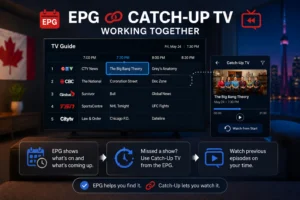
An accurate schedule serves as the functional backbone of catch-up TV. The EPG enables catch-up viewing by turning past schedule entries into clickable playback links. Pressing OK on yesterday’s news broadcast triggers the server to stream that specific archived file. Catch-up requires your IPTV service provider to actually record and store those past broadcasts on their servers. Most premium providers retain this footage for 24 hours to seven full days.
In TiviMate, you access this feature by navigating left in the guide to past programs and pressing OK. In IPTV Smarters Pro, look for the small clock icon next to channels that support archive playback. In Hot Player Pro, simply navigate to past programs within the main Guide tab.
If catch-up is unavailable for a network, past programs will remain unclickable text. Catch-up availability depends entirely on both your provider’s server capacity and the specific channel’s permissions. By choosing a robust service, you gain access to these features automatically. For example, iptvcad supports extensive catch-up on compatible channels for all subscribers.
What should you expect from a Canadian channel EPG?
Canadian television viewers face unique streaming challenges, particularly concerning local network variations and vast time zone differences.
Major English and French Canadian networks
You should expect highly reliable EPG coverage for major English Canadian channels including CBC, CTV, Global, CTV2, City TV, and all sports varieties like TSN 1-5 and Sportsnet. Major French Canadian channels also enjoy robust guide support. Viewers in Quebec will easily find accurate schedules for TVA, Radio-Canada, RDS, TVA Sports, and V Télé.
Specialty, regional, and international channels
Availability varies widely for regional and specialty networks. United States channels available on Canadian IPTV services generally feature highly reliable schedules. However, international feeds from overseas depend entirely on the origin country’s data reporting.
Canadian guide timing occasionally shifts due to the country’s multiple time zones spanning from the Pacific to the Atlantic. A premium provider resolves this automatically. For instance, iptv canada handles Canadian EPG with extreme precision, optimizing its backend specifically for Canadian time zones and local channel lineups.
What are the best practices for an optimal EPG experience?
Follow these insider tips to maintain a perfectly functioning television schedule:
- Always use the Xtream Codes login method instead of a raw M3U URL whenever possible. The EPG API handles schedule data much more reliably.
- Set your guide to refresh automatically overnight. This guarantees a fresh, accurate schedule every single morning.
- Load a maximum of three to five days of EPG data. Pulling excessive days drastically slows down app performance.
- Clear your application’s EPG cache monthly as a form of routine digital maintenance.
- Report mapping errors directly to your provider. Good IPTV service providers actively monitor tickets and fix broken channel assignments quickly.
- Use Hot Player Pro if you subscribe to iptvcad. The backend is completely pre-optimized for Canadian broadcasting.
- Configure your exact time zone in your app settings immediately after your initial setup to prevent frustrating time-shift errors.
- Always test the guide accuracy thoroughly during any free trial period. A messy schedule is a massive red flag regarding a provider’s overall technical quality.
Next Steps for Optimizing Your IPTV Setup
An accurate Electronic Program Guide transforms a confusing, randomized list of streaming links into a proper, enjoyable television experience. Understanding how the XMLTV data fetches, loads, and syncs allows you to configure your apps correctly and resolve blank screens in seconds.
Ultimately, the quality of your schedule reflects the technical quality of your provider. Premium services invest heavy resources into maintaining accurate, up-to-date guide data for their users. You deserve a setup that functions seamlessly without constant manual adjustments. Try iptvcad with a free trial today to experience a properly configured EPG with accurate Canadian channels and deep catch-up support from the very first click.
Frequently Asked Questions (FAQ)
What is EPG on IPTV?
An EPG (Electronic Program Guide) is the digital television schedule built into your streaming app. It shows current and upcoming shows, allowing you to browse channel content and access catch-up TV features effortlessly.
How do I add EPG to my IPTV app?
You can add an EPG by logging into your app using your provider’s Xtream Codes credentials, which loads the schedule automatically. Alternatively, you can paste an XMLTV URL link directly into the app’s playlist settings.
Why is my IPTV EPG not working?
Your EPG may fail due to an expired XMLTV URL, a disconnected provider server, or corrupted app data. Fix this by verifying your EPG link, clearing the application cache, and forcing a manual data refresh in the settings menu.
What is an XMLTV EPG URL?
An XMLTV EPG URL is a web link that points to a structured data file containing television programming schedules. IPTV apps download this specific file to populate their interactive TV guides.
Why is my EPG showing the wrong programs?
When your guide displays incorrect shows, the internal channel mapping from your provider is misaligned. Clear your EPG cache to force an update, or contact your IPTV service provider so they can correct the database error.
How do I fix EPG time being wrong on IPTV?
Fix incorrect program start times by opening your IPTV app’s EPG settings and manually adjusting the time zone. Ensure it matches your local Canadian time zone (e.g., Eastern or Pacific) to align the schedule perfectly.
Does iptvcad include EPG?
Yes, iptvcad includes full, highly accurate EPG support as a standard feature for all subscribers. The backend is specifically optimized for both English and French Canadian networks.
What is the best IPTV app for EPG in Canada?
TiviMate offers the most robust and customizable EPG interface for Android TV users. However, iptvcad subscribers get the best seamless experience using Hot Player Pro, which comes pre-configured with Canadian schedule data out of the box.
How does EPG work with catch-up TV?
The EPG provides the interactive menu required for catch-up TV. By scrolling backward in the program guide and clicking on a previously aired show, the app triggers the server to stream that specific recorded broadcast.