Canadian hockey fans are getting squeezed from every direction. Cable bills frequently climb past $150 per month, while official streaming apps often only cover half the schedule. Worse still, regional blackouts constantly block viewers from watching their own local teams.
The good news is that in 2026, you can watch more hockey than ever before for a fraction of what traditional cable costs. Building a legitimate, reliable, and complete hockey streaming setup is highly achievable when you assemble the right hardware, software, and network connections.
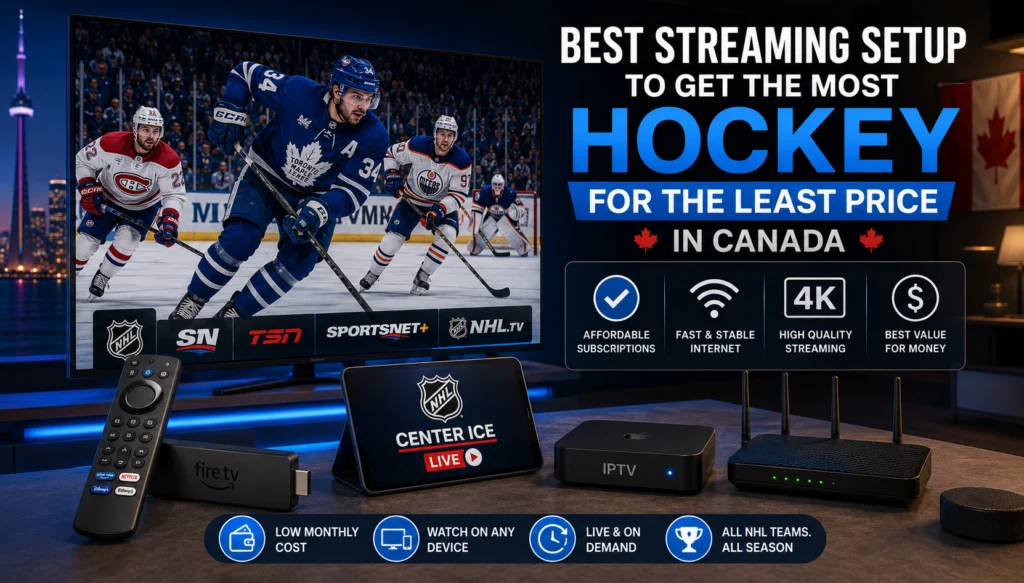
This guide breaks down every component required to create the perfect Canadian hockey streaming setup. By choosing the correct subscription, devices, applications, and internet hardware, you can ensure you never miss a puck drop and never overpay again.
What does the most hockey for the least price actually mean?
Before buying hardware or downloading apps, defining the ultimate goal is necessary. “Most hockey” means gaining access to every Canadian NHL team’s games across all seven franchises. This requires both English and French broadcasts from Sportsnet, TSN, CBC, RDS, and TVA Sports. It also includes American team games, the 24-hour NHL Network, complete playoff coverage through the Stanley Cup Final, and all pre-game and post-game shows.
“Least price” means eliminating long-term cable contracts and refusing to pay for unused channels. It also requires avoiding duplicate subscriptions that cover the exact same games. Furthermore, true value means you can cancel anytime during the off-season, ensuring you never pay for hockey content during the summer months.
The benchmark to beat is the standard full cable sports package, which typically runs $100 to $150 per month with a binding contract. Alternatively, stacking multiple official streaming apps costs $55 to $70 per month and still leaves you vulnerable to blackouts. The goal of this setup is to beat both traditional options on price while exceeding their coverage.
Which Canadian hockey broadcast networks do you need to cover everything?
To cover every game, you must access multiple specific networks. Sportsnet carries the majority of NHL games, including most Canadian matchups, meaning you need Sportsnet Ontario, East, West, Pacific, One, and National. TSN operates as the secondary NHL broadcaster, carrying select regional games each week across TSN1 through TSN5.
For Saturday night games, CBC broadcasts Hockey Night in Canada for free over the air. French-language fans require RDS as the primary broadcaster for the Montreal Canadiens, alongside TVA Sports for secondary and playoff coverage. Finally, the NHL Network provides comprehensive 24-hour analysis and highlights. Currently, no single official streaming app offers all of these networks in one place.
Why is an IPTV subscription the core of your streaming setup?
The foundation of the most complete and affordable Canadian hockey streaming setup available in 2026 is a premium IPTV service like iptvcad. A single iptv subscription covers every essential hockey channel, including all variants of Sportsnet and TSN, plus CBC, RDS, TVA Sports, and the NHL Network.
Because you access the licensed Canadian broadcasts that hold the direct regional rights, you eliminate local blackouts. The service operates on a month-to-month basis, allowing you to cancel in April after the Cup is awarded and resubscribe in October.
This single service effectively replaces Sportsnet Now, TSN Direct, and NHL Network subscriptions at a significantly lower combined cost. For fans exclusively following American teams from outside Canada, NHL League Pass remains useful, but for the vast majority of Canadian viewers, iptvcad covers everything required.
What are the best devices for your Canadian hockey streaming setup?
Your viewing experience relies heavily on the streaming hardware you select. For the primary viewing device in your living room, the Amazon Firestick 4K Max offers the best overall value. Costing approximately $60 to $70, it supports 4K HDR, features a fast processor capable of handling HD hockey streams without stuttering, and supports Wi-Fi 6.
Choose an Android TV Box if you want maximum performance and storage. Costing between $50 and $150, these devices offer more RAM to manage larger stream buffers and provide full Google Play Store access.
Choose the Nvidia Shield Pro if you demand the absolute premium choice. Priced around $200 to $250, the Shield handles 4K HDR effortlessly and delivers the best performance for heavy applications.
For secondary televisions in a bedroom or cottage, a basic Amazon Firestick costs under $40 on sale. Because iptv canada offers multi-connection plans, you can stream independently on both TVs simultaneously for a fraction of the cost of renting a second cable box. You can also utilize your mobile phone or tablet to follow road games when away from home.
Which apps are best for your hockey streaming setup?
The software you install on your device dictates how easily you can navigate the hockey schedule. Hot Player Pro stands out as the top recommendation for iptvcad subscribers. This app comes pre-configured for the iptvcad channel lineup, features advanced buffer management to minimize freezing during peak game times, and offers a full Electronic Program Guide (EPG).
For power users running Android TV boxes, TiviMate Premium is exceptional software. Costing approximately $4.99 per year, TiviMate allows users to record entire seasons automatically, features panel mode for easy navigation, and offers the cleanest EPG implementation available.
iPhone users and beginners should install IPTV Smarters Pro, which offers a simple setup process. Households watching primarily through native Samsung or LG smart TV apps will get the best results using IBO Player, which features a TV-first interface designed specifically for standard remote controls.
What is the ideal internet setup for smooth hockey streaming?
A reliable internet connection is mandatory for live sports. A single HD stream requires a minimum of 15 Mbps, while 4K streams demand at least 25 Mbps. For a full household running multiple simultaneous streams, a 100 Mbps plan from providers like Bell, Rogers, Videotron, or Cogeco is recommended.
Wired ethernet is essential for your main television. Wi-Fi packet loss directly causes freezing during live broadcasts. You can run ethernet cables along baseboards, through walls, or use Powerline adapters to transmit data through existing electrical wiring.
Upgrading your Internet Service Provider (ISP) provided router is the most overlooked streaming improvement. A dedicated Wi-Fi 6 router ($100 to $200) allows you to enable Quality of Service (QoS) settings. By prioritizing your IPTV device over other household devices in the router settings, your hockey stream remains stable even if someone else starts watching YouTube.
Furthermore, Canadian ISPs frequently throttle streaming traffic between 7 PM and 10 PM. If your HD games constantly buffer during peak hours, utilizing a VPN with the WireGuard protocol will encrypt your traffic, preventing the ISP from identifying and throttling your hockey stream.
How much do complete streaming setups cost by budget tier?
You can customize your hardware costs based on your household’s specific needs.
A budget setup costs under $50 in total hardware. This includes a basic Amazon Firestick, the free IPTV Smarters Pro app, and a standard iptv canada monthly plan. This suits casual fans or single-person households.
A mid-range setup costs $100 to $150. This pairs an Amazon Firestick 4K Max with an ethernet adapter, utilizes Hot Player Pro or TiviMate Premium, and runs on an iptvcad premium multi-connection plan. This configuration is ideal for families with two televisions.
A premium setup costs $200 to $300. This features an Nvidia Shield Pro for the main TV, a Firestick 4K Max for the bedroom, TiviMate Premium, and a dedicated Wi-Fi 6 router. This delivers zero buffering and unmatched 4K HDR performance for serious hockey households.
How do you set up your hockey streaming system step by step?
Setting up your system takes under 15 minutes by following these precise steps:
- Visit iptvcad.ca to claim a free trial and receive your credentials by email instantly.
- Plug your Amazon Firestick or Nvidia Shield into the TV and connect it to your router via ethernet.
- Install Hot Player Pro or TiviMate Premium from the respective app store.
- Open the application, select “Xtream Codes login”, and enter the username, password, and server URL from your iptvcad welcome email.
- Wait for the channels and EPG guide to load automatically (usually under two minutes).
- Set your time zone in the app settings to ensure accurate game times.
- Configure the buffer settings to 5 to 8 seconds in the app to prevent stuttering.
- Log into your router’s admin panel and set your streaming device to the highest QoS priority.
- Test channels like Sportsnet and TSN at 7 PM on a weeknight to simulate live game conditions.
How much do you actually save compared to cable?
A full cable sports package costs $1,200 to $1,800 per year and requires a contract. Stacking official streaming platforms like Sportsnet Now, TSN Direct, and DAZN costs approximately $780 per year, and you still face regional blackouts. A full season with iptvcad costs a fraction of all these options.
Hardware costs also heavily favor streaming. Cable providers typically charge $10 to $15 per month to rent a single receiver box ($120 to $180 annually per TV). An Amazon Firestick is a one-time $40 purchase. Because you can cancel the IPTV service after the Stanley Cup Final in June and resume in October, you avoid paying for four months of zero hockey content. Over five years, a traditional cable setup costs up to $9,000, whereas this optimized streaming setup keeps thousands of dollars in your pocket.
How do you fix common streaming setup problems?
If your app is installed but channels fail to load, check that your credentials are entered exactly as provided, paying special attention to typos in the server URL.
If a hockey channel loads but constantly buffers during games, switch immediately from Wi-Fi to a wired ethernet connection and increase the buffer size in your app’s settings. If this only happens during evening games, ISP throttling is the likely culprit, and you should implement a VPN.
If the EPG shows the hockey schedule incorrectly, clear the EPG cache in the app settings, force a refresh, and verify your device’s time zone settings.
If your application crashes during peak playoff games, clear the device cache to free up memory, ensure the app is updated to the latest version, and restart the physical streaming device before the puck drops.
What are the pro tips for the ultimate hockey streaming experience?
Set up channel favorites in TiviMate for every specific Sportsnet and TSN channel so you can locate games in seconds. Schedule an automatic EPG refresh overnight so you always wake up to a fresh, accurate hockey guide.
Use picture-in-picture mode on supported Android boxes to watch two games simultaneously during busy Thursday night schedules. Schedule your internet router to reboot automatically at 6 AM every day to ensure a fresh, optimal connection before game time. Finally, use the RDS feed for Montreal Canadiens games even if you primarily watch in English, as the source picture quality is frequently superior.
Is this hockey streaming setup legal in Canada?
Using hardware like the Amazon Firestick and Nvidia Shield is completely legal in Canada. Installing software like TiviMate and IPTV Smarters is also entirely legal.
The legality question focuses entirely on the subscription provider. iptvcad operates as a legitimate Canadian IPTV service. Watching licensed Canadian broadcasts through a legitimate service is completely legal for the end user. You should strictly avoid providers offering pirated content at suspiciously low prices. Legitimate providers feature transparent pricing, real customer support, and a specific focus on regional Canadian content. The CRTC governs broadcast licensing in Canada, and using licensed broadcast feeds through a legitimate provider keeps you fully compliant.
Build your ultimate hockey streaming setup today
The best hockey streaming setup in Canada in 2026 is simpler and cheaper than most fans realize. Using iptvcad as your subscription foundation covers Sportsnet, TSN, RDS, TVA Sports, CBC, and the NHL Network in one affordable monthly plan.
Pairing that service with a Firestick 4K Max, Hot Player Pro, and a wired ethernet connection eliminates buffering and expensive hardware rentals. You gain superior coverage, zero blackouts, and complete freedom from cable contracts. Canadian hockey fans deserve to watch their teams without being overcharged, and this precise setup makes that reality possible. Claim your free trial at iptvcad.ca today, get set up in under 10 minutes, and be ready before the next puck drops.
Frequently Asked Questions
What internet speed do I need for IPTV hockey streaming?
For a single HD hockey stream, you need a minimum of 15 Mbps. If you want to watch in 4K or have multiple people streaming in the house at once, a 50 Mbps to 100 Mbps internet plan is highly recommended to prevent buffering. You can test your current speed at Speedtest.net.
Why do my hockey streams buffer only at night?
Canadian internet service providers often throttle bandwidth during peak evening hours (7 PM to 10 PM) when network traffic is highest. Using a VPN with the WireGuard protocol encrypts your traffic so your ISP cannot identify and slow down your hockey stream.
Can I share my IPTV hockey subscription with family?
This depends on your specific subscription tier. iptvcad offers multi-connection plans that allow you to watch on two or more devices simultaneously within the same household.
What is the best device for recording hockey games?
Choose an Android TV Box or an Nvidia Shield Pro if you want to record games. Combined with the TiviMate Premium app, these devices allow you to plug in a USB drive and schedule automatic recordings for your favorite team’s entire season.
How do I stop blackouts on regional NHL games?
Local blackouts happen because cable networks restrict broadcasts based on your geographic location. Using a dedicated IPTV service like iptvcad provides direct access to all regional feeds across Canada, bypassing localized blackout restrictions entirely.