

If you spend the winter in Florida, Arizona or Texas, your Canadian TV usually stops at the border. Cable and satellite apps from Canadian providers are locked to Canada, much of CBC Gem is geo-restricted, and the old Slingbox trick stopped working in 2022. The simplest way for snowbirds to watch Canadian TV in the USA is an internet-based IPTV subscription that isn’t tied to a Canadian connection, paired with a vacation suspension on your home TV service. This guide compares every option, shows the real cost of a six-month winter, and gives you a packing checklist so your TV works the day you arrive.
Key takeaways
- Bell says live and on-demand Fibe TV content isn’t available outside Canada; only downloaded recordings travel with you.
- CBC Gem’s video content is restricted to viewers in Canada, though some CBC news programming is available abroad.
- Slingbox servers went offline permanently on November 9, 2022.
- VPNs can work but may break a streaming service’s terms, and many services actively block them.
- An IPTV subscription plus a vacation suspension on your Canadian TV service is often the cheapest and simplest winter setup.
Why Your Canadian TV Stops Working in the US
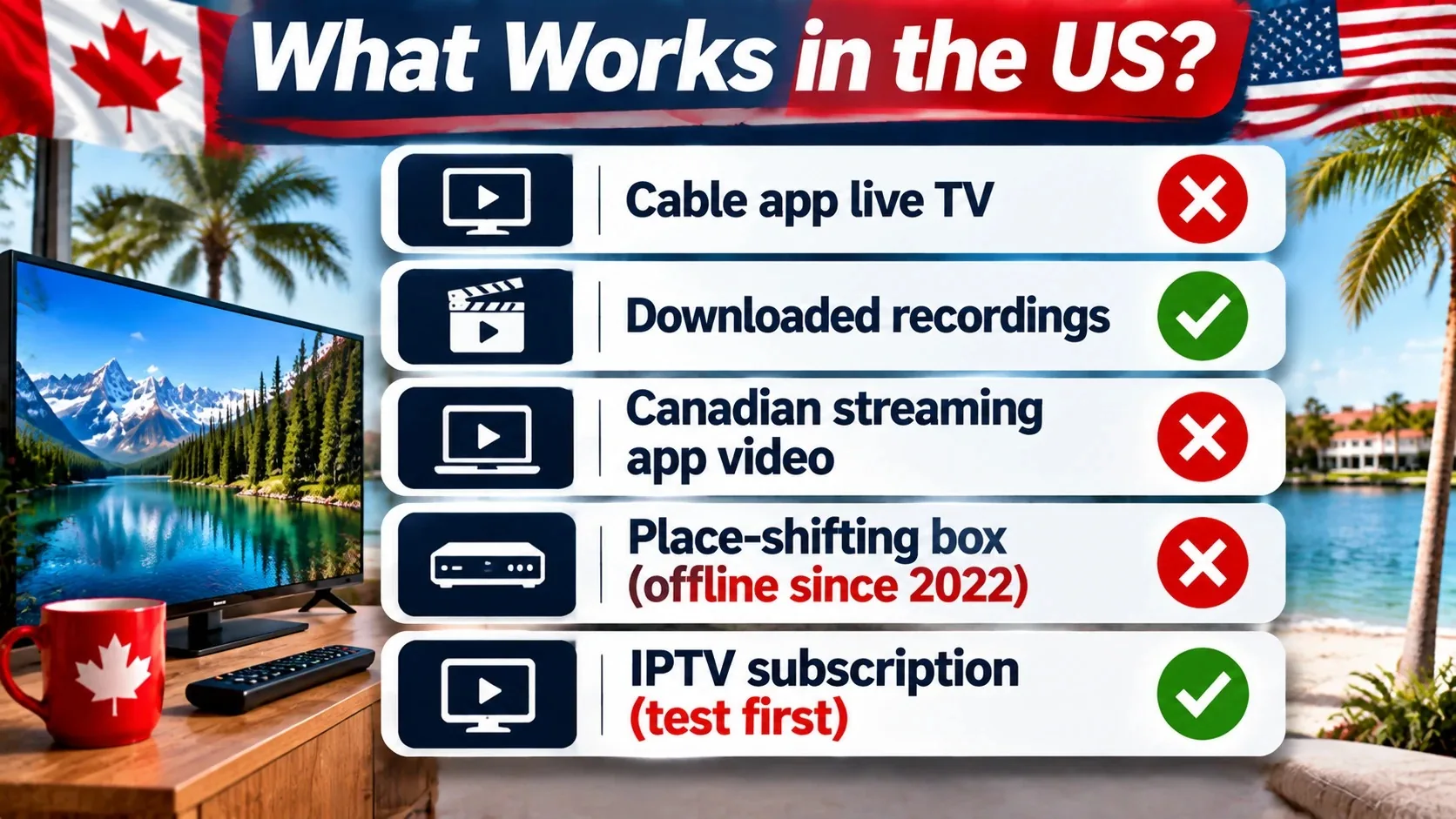
Canadian broadcasters and TV providers buy the rights to show programs in Canada only. To respect those deals, their apps check your IP address and block streams from outside the country. That’s why the same app that works at your cottage shows an error in your Florida condo.
What happens with each common service
| Service | What works in the US | What doesn’t |
|---|---|---|
| Bell Fibe TV app | Recordings downloaded in Canada with Download and Go | Live TV and On Demand |
| CBC Gem | Some CBC news content on CBC.ca and the CBC News app | Most Gem video, including popular series |
| Other Canadian cable and streaming apps | Varies; usually very little | Live channels and most on-demand content |
| Satellite dish | Nothing outside the Canadian service area | Signal and service rules stop at the border |
| Slingbox | Nothing | Servers shut down in 2022 |
| IPTV subscription | Live channels, movies and series over the internet | Depends on the provider; test first |
Option 1: Your Canadian Cable or Satellite App
Many snowbirds assume their provider’s app will follow them south. In most cases, it won’t. Bell’s reply on its Fibe TV App Store listing explains that live and On Demand content isn’t available outside Canada because of content rights, and that only recordings can be accessed on a phone, tablet or computer when travelling abroad. Bell’s community forum adds that recordings can only be downloaded while you’re still in Canada.
Good for: a few favourite shows you record and download before you leave.
Not good for: live news, live sports or anything that airs while you’re away.
Option 2: Free Canadian Streaming Apps
CBC’s help centre is clear: video content on CBC Gem is restricted to people in Canada. However, CBC says you can still reach CBC News content on CBC.ca and the CBC News app, plus select programming on CBC Listen, from outside the country (CBC Help Centre). Other Canadian network apps follow similar rules.
Good for: keeping up with Canadian news headlines.
Not good for: full shows, live channels or sports.
Option 3: A VPN Set to Canada
A VPN routes your connection through a server in Canada so apps think you’re at home. It sometimes works, but there are real downsides:
- Terms of service: many streaming services don’t allow VPN use to get around location rules.
- Blocking: providers detect and block VPN servers. Bell’s own forum notes that a VPN is no guarantee of access.
- Speed: routing your stream to Canada and back adds delay and can cause buffering on condo or RV-park Wi-Fi.
- Cost: you still pay for your Canadian TV service plus the VPN.
A VPN is still useful for privacy on shared networks. Our guides to using a VPN for IPTV and staying safe on public Wi-Fi explain when it helps.
Option 4: Slingbox and “Place-Shifting” Boxes
For years, snowbirds left a Slingbox connected to their cable box at home and watched it from anywhere. That option is gone. Sling Media took the Slingbox servers permanently offline on November 9, 2022. Some hobbyist workarounds exist, but they need technical skill and a working box left at home, which means your home TV service has to stay fully active and paid.
Option 5: An IPTV Subscription
An IPTV subscription delivers live channels, movies and series over the internet to an app on your TV, phone or tablet. Because it isn’t tied to a Canadian cable box or a Canadian TV provider’s app, you can usually log in from your winter home with the same app you use in Canada. Before you leave, test it from a connection outside Canada or confirm with the provider that it works from the US, since policies differ between providers.
For snowbirds, IPTV has some clear advantages:
- One login for both homes. The same account works in Ontario in July and Florida in January.
- Small and portable. A streaming stick fits in a carry-on.
- Canadian, US and international channels in one place, plus movies and series on demand.
- Short plans. Pay for 3 or 6 months to match your stay instead of a 2-year contract.
- Multi-screen options if you have grandchildren visiting or a second TV.
Understand the rules before you choose. Our guide Can you use IPTV in Canada? covers the legal side in plain language.
Pause Your Home TV While You’re Away
There’s no point paying full price for cable that nobody watches for half the year. Many Canadian providers offer some kind of vacation or seasonal suspension, but the rules differ:
- Rogers (former Shaw customers): Rogers’ vacation suspension page says you can suspend internet, TV or home phone for 30 to 180 days, with TV and phone suspension at no cost and internet suspension at $10 a month.
- Rogers Ignite: community forum users report that Ignite services must be suspended together, so you can’t always pause TV while keeping internet on for cameras or a smart thermostat. Confirm with Rogers before you leave.
- Telus Optik TV: a reply on Telus’s community forum says vacation suspension isn’t available for Optik TV on its own, and suggests downgrading to the most basic package instead.
- Bell and others: call before you leave and ask what seasonal options exist for your plan.
Tip: if you have security cameras, a smart thermostat or a water-leak sensor at home, keep your home internet active even if you pause TV.
What a Snowbird Winter Really Costs
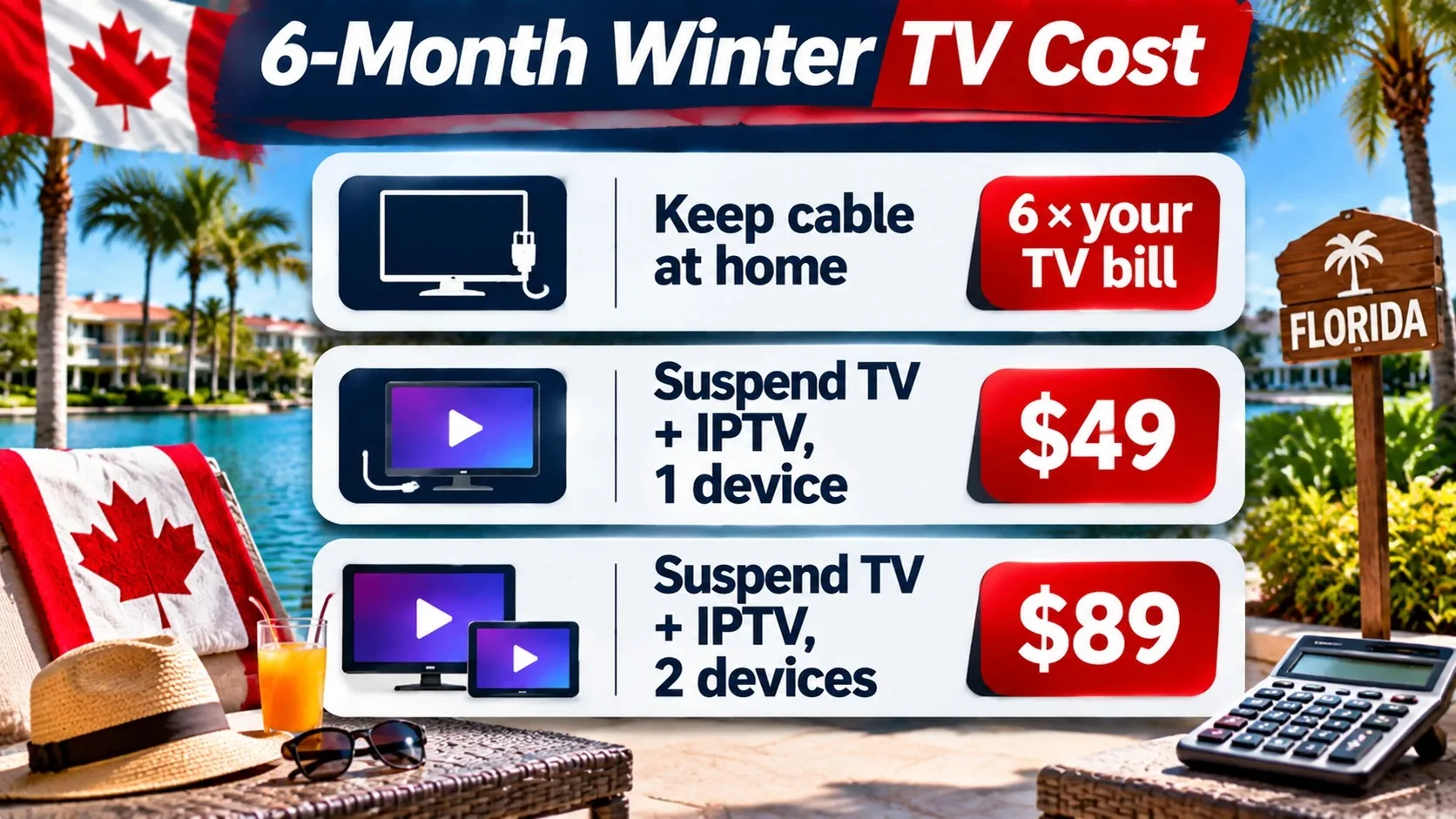
Here’s a simple way to compare. Fill in your own cable bill from your last statement.
| Setup for a 6-month winter | What you pay |
|---|---|
| Keep full cable at home and watch nothing | 6 × your monthly TV bill |
| Keep cable plus a VPN (may not work) | 6 × your TV bill + VPN cost |
| Suspend TV at home + IPTVCAD 6 months, 1 device | Suspension fee (if any) + $49 |
| Suspend TV at home + IPTVCAD 6 months, 2 devices | Suspension fee (if any) + $89 |
Snowbirds who come home in spring and keep IPTV year-round can cancel cable entirely. A 12-month plan is $79 for one device, or $129 for two. See our guide to how much IPTV costs in Canada for a full comparison.
Snowbird Packing Checklist for TV
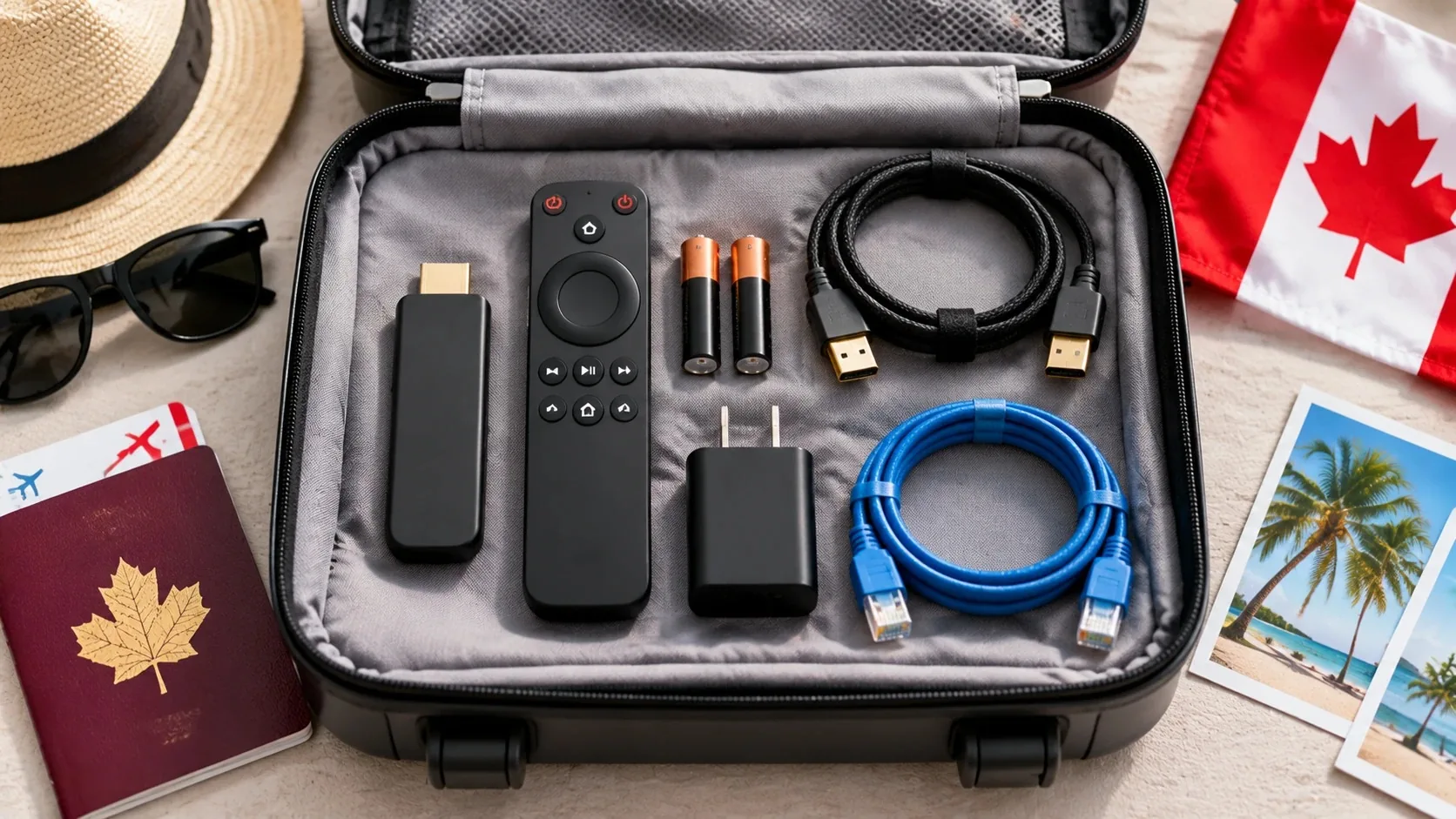
- Streaming device: a Fire TV Stick, Google TV streamer or Android box. Install your IPTV app and log in before you leave, while you’re on familiar Wi-Fi. Our Firestick installation guide walks you through it.
- Power adapter and HDMI extender: condo and rental TVs are often mounted with little room behind them.
- Remote with spare batteries.
- Your login details saved somewhere safe (username, password and server URL).
- A short Ethernet cable if your winter home has a router you can plug into.
- A travel router (optional): useful in RV parks where the Wi-Fi requires a sign-in page that streaming sticks can’t handle.
- Your provider’s support contact saved on your phone. IPTVCAD support runs 24/7 on WhatsApp.
Making It Work on Condo and RV-Park Wi-Fi
Shared Wi-Fi is the biggest challenge for snowbirds. Dozens of neighbours stream at the same time each evening, so speeds drop just when you want to watch the news. Some tips:
- Test the speed on day one. Run a speed test on your streaming device. For one HD stream, you want a steady connection; Netflix, for example, recommends 5 Mbps or higher for 1080p, and live TV is more comfortable with extra headroom.
- Get your own line if you stay all winter. Many condos let you order internet from a local US provider for your stay.
- Lower the quality in the evening. Choose HD instead of FHD or 4K versions of channels when the network is busy.
- Use a wired connection or a travel router placed near the window facing the park’s access point.
- Adjust your player’s buffer. See how to optimize IPTV streaming on low bandwidth.
Time Zones and the TV Guide
Most snowbird destinations are in different time zones from home. Florida shares Eastern Time with Ontario and Quebec, but Arizona sits on Mountain Standard Time and doesn’t move its clocks for daylight saving time in most of the state. If you come from British Columbia, Florida puts you three hours ahead of your usual schedule.
In your IPTV app, set the guide’s time zone to where you are now so game times and news line up. If you miss something because of the time change, catch-up or on-demand content can fill the gap. Our EPG setup guide shows where to change it.
What Snowbirds Watch Most
- Canadian news to stay connected with home
- Hockey and curling through the winter season
- French-language channels for snowbirds from Quebec
- Familiar Canadian series and local channels from your region
- International channels for snowbirds with roots abroad; see how to get international content on IPTV
During your trial, check that the channels you care about most are in the lineup and load well from your winter location.
How IPTVCAD Works for Snowbirds
IPTVCAD is our own service, so here’s the plain version. You get 25,000+ live channels, including Canadian channels in English and French, plus 120,000+ movies and series. It works on Firestick, Android TV and Google TV, Samsung and LG smart TVs, iPhone, iPad, Android, PC and Mac. Plans run for 1, 3, 6 or 12 months, so you can match your stay, and you can choose 1 to 4 devices on our multi-screen plans page.
Before you head south, request a 24-hour free trial (no credit card) and set up your device at home. Tell our support team on WhatsApp where you’ll be spending the winter, and we’ll help you confirm everything is ready. Payment is by Interac e-Transfer from your Canadian bank, and every plan has a 7-day money-back guarantee. When you’re ready, see our IPTV subscription plans.
Step by Step: Set Up Before You Leave
- Two weeks before: call your Canadian TV provider about a vacation suspension and confirm the dates.
- One week before: request an IPTV free trial and install the app on the device you’re taking.
- Test at home: check your must-have channels, the guide and on-demand content.
- Ask support to confirm the service works from your US address.
- Subscribe for the length of your stay.
- Pack the device with its power adapter, remote and HDMI extender.
- On arrival: connect to the Wi-Fi, run a speed test, set the guide’s time zone and start watching.
Bottom Line
Canadian cable apps, CBC Gem video and satellite TV mostly stop at the border, and Slingbox is gone for good. A VPN can work but adds cost and may break a service’s terms. For most snowbirds, the simplest winter setup is to suspend TV at home and use an IPTV subscription on a small streaming device you bring with you. Test it before you leave, set the guide to your winter time zone, and you’ll have your Canadian news, hockey and favourite shows from Florida to Arizona. Start with IPTVCAD’s plans and a free trial.
Frequently Asked Questions
Can I watch Canadian TV in the USA as a snowbird?
Yes, but not usually through your Canadian cable or satellite app, which is locked to Canada for live and on-demand content. Most snowbirds use an IPTV subscription on a streaming device, or watch recordings they downloaded before leaving.
Does the Bell Fibe TV app work in Florida?
Bell says live and On Demand content isn’t available outside Canada because of content rights. Recordings downloaded with Download and Go while you’re in Canada can be watched abroad.
Can I watch CBC Gem in the US?
CBC says video content on CBC Gem is restricted to people in Canada. You can still access CBC News content on CBC.ca and the CBC News app from outside the country.
Does Slingbox still work?
No. Sling Media took the Slingbox servers permanently offline on November 9, 2022.
Can I pause my Canadian TV service for the winter?
Often, yes. Rogers’ page for former Shaw customers lists a vacation suspension of 30 to 180 days with TV suspended at no cost. Rules differ by provider and plan, so call before you leave.
What internet speed do snowbirds need for IPTV?
A steady connection of at least 5 Mbps per HD stream is a minimum, with more headroom for busy evenings, FHD or 4K. Shared condo and RV-park Wi-Fi can slow down at night, so test on day one.
Will my IPTV subscription work in the US?
IPTV streams over the internet and isn’t tied to a Canadian TV box, but policies differ between providers. Use a free trial and ask support to confirm it works from your winter address before you pay.