The best IPTV for a Firestick isn’t just about channel count. It’s the combination of a Fire TV model that still allows IPTV apps, a provider that supports Xtream Codes logins and stays stable at peak times, and a good player app such as TiviMate or IPTV Smarters Pro, set up with the right settings. Get those right and a $70–$85 stick performs like a cable box. Get one wrong and you’ll be fighting buffering every Saturday night. This guide covers all of it, including the newer Fire TV models that no longer work with IPTV apps.
Key takeaways
- Check your Firestick first. Newer Vega OS models (Fire TV Stick 4K Select, Fire TV Stick HD 2026) block sideloaded apps, which most IPTV players need.
- Choose a provider with Xtream Codes. It loads much faster than a huge M3U playlist on a stick with limited storage.
- Best apps: TiviMate for the best TV guide, IPTV Smarters Pro for a free, simple start.
- Five settings make the biggest difference: buffer size, hardware decoding, daily guide refresh, cache clearing and a wired connection.
- Always test with a free trial on your own Firestick during a busy evening.
Step 1: Check Which Firestick You Have
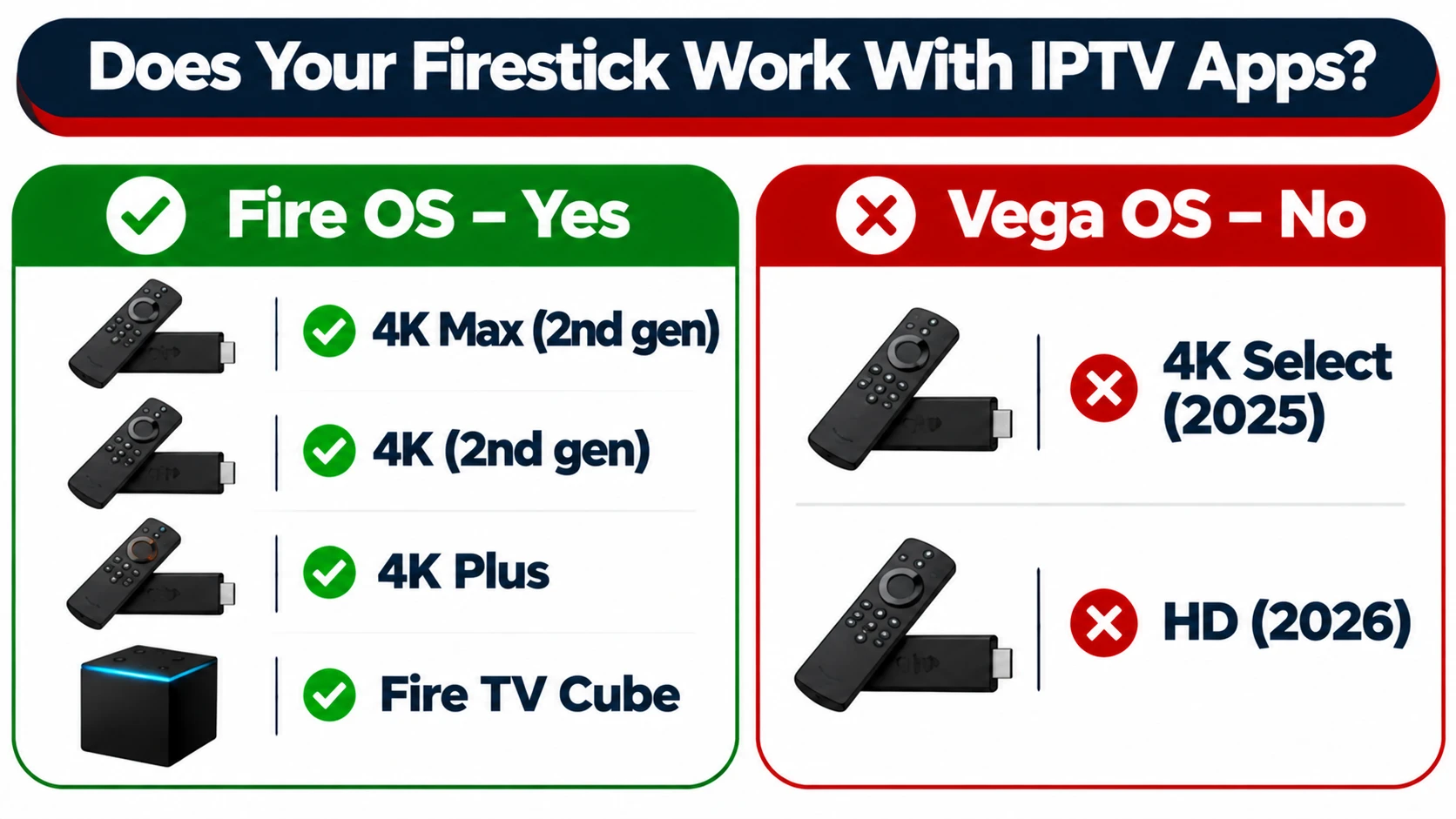
Since late 2025, Amazon has started moving its Fire TV sticks from Android-based Fire OS to Vega OS, a Linux-based system that only allows apps from the Amazon Appstore. Most IPTV players are installed by sideloading, so on a Vega OS stick they simply won’t install (Tom’s Guide explains the change).
| Fire TV model | Operating system | Works with IPTV player apps? |
|---|---|---|
| Fire TV Stick 4K Max (2nd gen, 2023) | Fire OS | ✅ Yes, the best choice |
| Fire TV Stick 4K (2nd gen, 2023) | Fire OS | ✅ Yes |
| Fire TV Stick 4K Plus | Fire OS | ✅ Yes |
| Fire TV Stick Lite / older HD models | Fire OS | ✅ Yes, but slower |
| Fire TV Cube (3rd gen) | Fire OS | ✅ Yes, very fast |
| Fire TV Stick 4K Select (2025) | Vega OS | ❌ No |
| Fire TV Stick HD (2026) | Vega OS | ❌ No |
To check yours: go to Settings → My Fire TV → About. If it says Vega OS, consider a Google TV device instead. Our guide to the best IPTV box in Canada compares the alternatives.
What Makes an IPTV Service Work Well on a Firestick
A Firestick has less memory and storage than a full TV box, so some IPTV services run much better on it than others. Look for these eight things:
| What to check | Why it matters on a Firestick |
|---|---|
| Xtream Codes login | Loads channels and the guide in sections. A giant M3U playlist can take a minute to parse on an 8 GB stick |
| Works with TiviMate and Smarters | These are the most reliable players on Fire OS |
| Stable at peak times | Saturday-night sports is when weak servers fail |
| A working TV guide (EPG) | Makes channel surfing feel like cable |
| Sensible channel groups | Lets you hide what you don’t watch, so menus stay fast |
| Multi-device plans | One stick per TV means one connection per TV |
| Free trial | The only real way to test on your stick and network |
| Setup support | Sideloading is new to many people. Quick help matters |
Best IPTV Player Apps for Firestick
| App | Best for | Cost | Login types |
|---|---|---|---|
| TiviMate | Best TV guide and channel surfing | Free basic version, paid premium upgrade | Xtream Codes, M3U |
| IPTV Smarters Pro | Beginners, simple setup, movies and series | Free | Xtream Codes, M3U |
| XCIPTV | Lightweight alternative | Free | Xtream Codes, M3U |
| GSE Smart IPTV | Flexible playlists | Free with optional upgrade | M3U, Xtream Codes |
Our suggestion: start with IPTV Smarters Pro because it’s free and easy, then try TiviMate if you watch a lot of live TV and want a cable-style guide. Read more in our roundup of the best IPTV players in Canada, or see how to log in to IPTV Smarters.
Xtream Codes vs M3U on a Firestick
Most providers give you both. On a Firestick, Xtream Codes is usually the better choice:
- Faster startup: the app loads categories as you open them, instead of reading one huge file every launch.
- Less storage used: important on 8 GB sticks, where storage fills up quickly.
- Movies and series separated: on-demand content appears in its own sections.
- Easier updates: new channels appear automatically without re-adding a playlist.
Use M3U only if your app doesn’t support Xtream Codes. Learn the difference in what M3U and Xtream Codes are.
How to Set Up IPTV on a Firestick (Quick Version)
- Enable developer options: Settings → My Fire TV → About, then select your device name seven times.
- Install Downloader from the Amazon Appstore.
- Allow Downloader to install apps: Settings → My Fire TV → Developer options → Install unknown apps → Downloader → On.
- Install your player (IPTV Smarters Pro or TiviMate) using the app developer’s official download link.
- Log in with Xtream Codes: enter the server URL, username and password from your provider.
- Let the channels and guide load, then add favourites.
For full step-by-step instructions with every menu, follow our Firestick IPTV installation guide.
The 6 Settings That Stop Firestick Buffering
1. Increase the buffer size
In your player’s settings, set the buffer to medium on Lite and HD sticks, and large on 4K and 4K Max models. A bigger buffer smooths out short network dips. More in our guide to IPTV buffer settings.
2. Use the hardware decoder
Hardware decoding lets the Firestick’s video chip do the work, which keeps playback smooth. Switch to software decoding only if one specific channel shows glitches.
3. Refresh the TV guide once a day
Refreshing the guide too often slows the app down. Once every 24 hours is enough. Set your time zone manually so programme times line up. If the guide is empty, see our EPG troubleshooting guide.
4. Clear the cache monthly
Player apps build up cached data that slows them down over time. Clear it every month or two. Here’s how to clear IPTV cache on every device.
5. Turn off background extras
Disable home-screen video autoplay and lengthen the screensaver delay. Uninstall apps you don’t use to free up memory and storage.
6. Go wired, or use 5 GHz Wi-Fi
Firesticks don’t have an Ethernet port, but a USB Ethernet adapter plugs into the power cable and gives you a wired connection, the single biggest fix for live sports. If you can’t run a cable, connect to your router’s 5 GHz network and keep the stick away from the back of the TV with an HDMI extender. See our picks for the best router for IPTV in Canada.
Which Firestick Model Is Best for IPTV?
| Model | Best for | Notes |
|---|---|---|
| Fire TV Stick 4K Max (2nd gen) | Most people | Fastest stick, Wi-Fi 6E, smooth TiviMate guide |
| Fire TV Stick 4K (2nd gen) | Budget 4K TVs | Good performance, slightly slower menus |
| Fire TV Cube (3rd gen) | Power users | Built-in Ethernet port, very fast |
| Lite / older HD | Second TV, bedroom | Works, but large guides load slowly |
| Vega OS models | Not for IPTV apps | Choose a Google TV device instead |
Sideloading Safely
- Download player apps only from the developer’s official website or a trusted link from your provider.
- Never install “free IPTV” apps that promise every channel at no cost. Some contain malware.
- Only allow unknown apps for Downloader, not for every app.
- Never enter banking, email or Amazon passwords into an IPTV app.
- Keep your Firestick’s software updated.
Common Firestick IPTV Problems and Fixes
| Problem | Likely cause | Fix |
|---|---|---|
| Buffering on live sports | Wi-Fi congestion or small buffer | Ethernet adapter, 5 GHz Wi-Fi, larger buffer |
| App won’t install | Vega OS stick, or unknown apps not allowed | Check OS version, enable Downloader in developer options |
| Guide is empty or wrong | EPG not loaded or wrong time zone | Refresh EPG, set time zone manually |
| App slow or crashing | Storage full, cache build-up | Clear cache, uninstall unused apps, use Xtream Codes |
| Black screen on one channel | Decoder issue or channel down | Try software decoder for that channel, or test another |
| Nothing works at all | Login or network issue | Re-enter login details, restart stick and router |
Still stuck? See IPTV not working: how to fix it.
Firestick vs Other Devices for IPTV
| Device | Strengths | Weaknesses |
|---|---|---|
| Fire TV Stick (Fire OS) | Cheap, small, huge community, runs TiviMate and Smarters | No Ethernet port, limited storage, newer models moving to Vega OS |
| Google TV Streamer | Built-in Ethernet, more memory, Google Play | Costs more than a stick |
| Formuler box | Cable-style guide and remote, Gigabit Ethernet | Pricier, bought from specialist retailers |
| Smart TV app | No extra device needed | TV processors are often slower, fewer app choices |
If you already own a Fire OS Firestick, it’s a great IPTV device. If you’re buying new and your stick would be a Vega OS model, a Google TV device is the safer choice.
Game-Night Checklist for Firestick IPTV
Live sports put the most strain on your setup. Before a big game:
- Restart the Firestick an hour before, to clear memory.
- Close other streaming apps and pause large downloads on your network.
- Use a wired connection or the 5 GHz Wi-Fi band.
- Add the game channels to favourites so you’re not scrolling at puck drop.
- Keep a backup channel for the same game in your favourites, in case one feed has trouble.
- Check your subscription expiry date so it doesn’t run out mid-season.
Getting More From IPTV on a Firestick
- Favourites and hidden groups: hide channel categories you never watch. Menus load faster and channel surfing feels like cable.
- Catch-up TV: many channels let you replay shows from the past few days in the guide, where your provider supports it.
- Movies and series: with Xtream Codes, on-demand content appears in its own section in Smarters and TiviMate.
- Multi-view on bigger devices: watching several channels at once works better on powerful boxes than on a stick.
- Recording: Firesticks have little storage, so recording isn’t practical on most models. See how to record on IPTV for alternatives.
- Second TV: a second Firestick needs its own connection if both TVs watch at the same time.
Using IPTVCAD on a Firestick
Disclosure: IPTVCAD is our own service. Here’s how it fits the checklist above:
- Xtream Codes or M3U logins, so you can use the faster Xtream setup on your stick
- Works with IPTV Smarters Pro and TiviMate on Fire OS Firesticks and the Fire TV Cube
- 25,000+ live channels and 100,000+ movies and series in HD, FHD and 4K
- 1 to 4 devices per plan, so each Firestick in your home can have its own connection. See multi-screen plans.
- Free 24-hour trial with no credit card, and 24/7 WhatsApp support if you need help sideloading
Test it on your own Firestick with a free 24-hour trial, then see the plans.
Bottom Line
The best IPTV setup for a Firestick in Canada is a Fire OS stick (ideally the 4K Max), a provider with Xtream Codes and stable peak-time servers, and IPTV Smarters Pro or TiviMate with the right settings. Avoid Vega OS sticks if you need IPTV apps, go wired if you watch live sports, and always test on your own stick with a free trial before paying.
Frequently Asked Questions
What is the best IPTV for Firestick in Canada?
The best IPTV for Firestick is a provider that supports Xtream Codes, works with TiviMate and IPTV Smarters Pro, stays stable during busy evenings and offers a free trial so you can test on your own stick. IPTVCAD meets all of these, with plans from $19 a month.
Does IPTV work on the new Fire TV Stick 4K Select?
Usually not. The Fire TV Stick 4K Select and Fire TV Stick HD (2026) run Vega OS, which only allows Amazon Appstore apps and blocks sideloading. Use a Fire OS model or a Google TV device instead.
What is the best IPTV app for Firestick?
TiviMate has the best TV guide and live-TV experience. IPTV Smarters Pro is free, simple and great for beginners. Many people start with Smarters and later move to TiviMate.
Should I use Xtream Codes or M3U on a Firestick?
Xtream Codes, in most cases. It loads faster and uses less storage than a large M3U playlist, which matters on Firesticks with 8 GB of storage.
Why does IPTV buffer on my Firestick?
Usually because of Wi-Fi congestion, a small buffer setting or a full cache. A USB Ethernet adapter, 5 GHz Wi-Fi, a larger buffer and regular cache clearing fix most cases. If it buffers on every device, the problem may be the provider.
Which Firestick is best for IPTV?
The Fire TV Stick 4K Max (2nd gen) is the best for most people. The Fire TV Cube is faster and has an Ethernet port. Avoid Vega OS models if you need IPTV apps.
Can I use one IPTV subscription on several Firesticks?
Yes, but only as many can watch at the same time as your plan allows. For two TVs watching at once, choose a 2-device plan.